info@sellingos.com

+91 729 000 2939

WhatsApp Us
  • Home
  • About us
  • Services
    • Amazon
      • Amazon Europe Account Management Service
      • Amazon Global Account Management Service
      • Amazon India Account Management Service
    • Etsy
      • Etsy Account Management Services India
      • Etsy Account Management Services UK
    • eBay
      • Ebay USA Account Management Service
      • Ebay UK Account Management Service
    • Walmart Account Management Service
    • Flipkart Account Management Service
    • Shopify Store Management Services
    • IndiaMart Account Management Services
    • Jio Mart Account Management Service
    • Meesho Account Management Service
  • Solutions
    • Ecommerce Shipping & Logistics Solutions
    • Global Ecommerce Payment Solutions
    • Ecommerce Creative & Photoshop Solutions
    • End-to-End Dropshipping Solutions
  • Partner
  • Calculators
    • Walmart Calculator
    • Amazon Calculator
    • Etsy Calculator
    • Flipkart Seller Fees Calculator
    • Meesho Calculator
    • Amazon US Calculator
    • Ebay Calculator
  • Blog
  • Contact us
    • e-Commerce Account Management Gurgaon
    • e-Commerce Account Management Faridabad
    • e-Commerce Account Management Noida
Menu

Blog

HomeBlog
Blog, seller account management

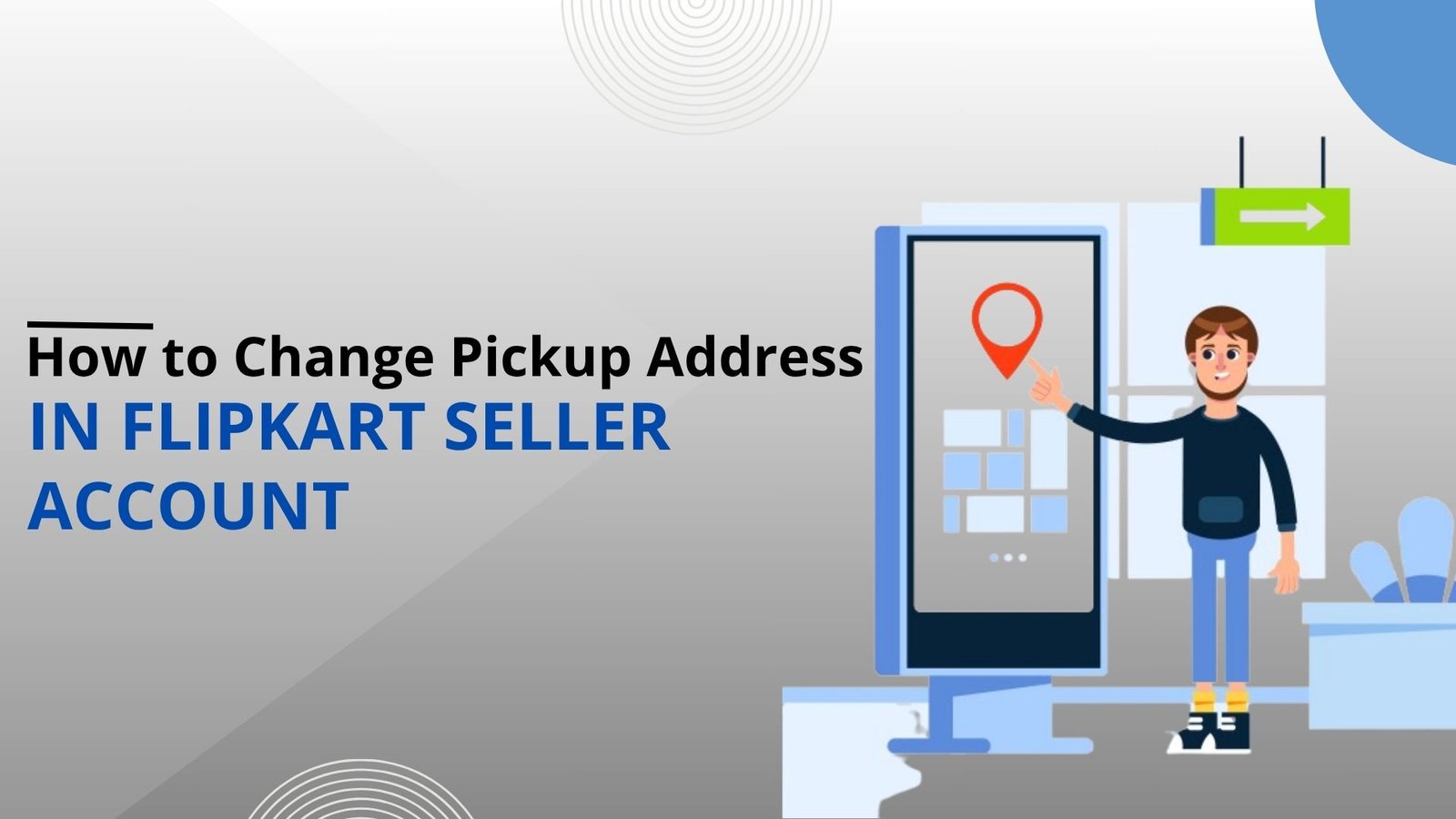
How to Change Pickup Address in Flipkart Seller Account

Posted by author-avatar Admin
On July 30, 2025
0 comments
Change Pickup Address

Did you accidentally enter the incorrect pickup address in your Flipkart seller account? Don’t worry—we got you covered. A correct pickup address is necessary for timely delivery, hassle-free logistics, and keeping seller performance on track. Small errors can lead to unnecessary costs, delayed orders, and disappointed customers. That’s why Flipkart has a wonderful option in-store for you, so that your business will not suffer.  Flipkart account management services ensure that things like updating the address are handled efficiently. So, in this blog, we will help you with various ways through which Flipkart account management services help you update your pickup address.

Why Your Pickup Address Matters

Your pickup location is not just a formality—it’s an essential part of your supply. A correct and verified address helps in quicker pickups, timely dispatch of your orders, and easy coordination with Flipkart’s logistic partners. Wrong address results in missed pickups, delayed delivery, increased return rates, and even order cancellation, affecting your seller rating and, more importantly, customer dissatisfaction.  So it’s necessary to take the right steps to avoid disruption and concentrate on business.

Before You Change, You Pick Up Address

Before editing your pickup address for your Flipkart seller account, it is best to follow a few key steps to ensure accuracy. Firstly, check if eKart, Flipkart’s logistics partner, has delivered to your new place. If the location is not serviced, you may need to use third-party logistics companies like Delhivery or XpressBees. Second, ensure you close out all outstanding orders before making any adjustments. Next, update the inventory of all your products listed temporarily to zero. This way, no orders are taken as your pick-up point is being updated. Finally, if you’re moving to another state, have your new GSTIN ready, as you will be required to provide it when updating your address between states.

Method 1: Via Flipkart Seller Web Dashboard

To modify your pickup address through the Flipkart Seller Web Dashboard, start by logging into your seller account. Then go to Account Settings or Shipping Settings, where you will find the Pickup Address option. Click Edit to modify the current address or select Add New Address if you are adding a new location. Enter all required information in a proper manner, such as contact name, phone number, PIN code, and save. Flipkart will process and update the new address within 1–2 days. In the meantime, monitor your dashboard for status or additional verification requests.

Method 2: Using Flipkart Seller Hub

First, go to your Flipkart Seller Hub. From the main menu, click Settings and then Shipping Settings. In this, locate Pickup Address and select Edit or Add New Address. Provide your new location information—like warehouse name, pin code, and contact info—and save your changes. For no errors, verify your pickup address monthly to help you with any operational adjustments. Professional Flipkart account management services can help you with this routine task, keeping your logistics setup precise without any disturbances. During the review period, keep an eye on your dashboard for approval or further requests.

Step- 1
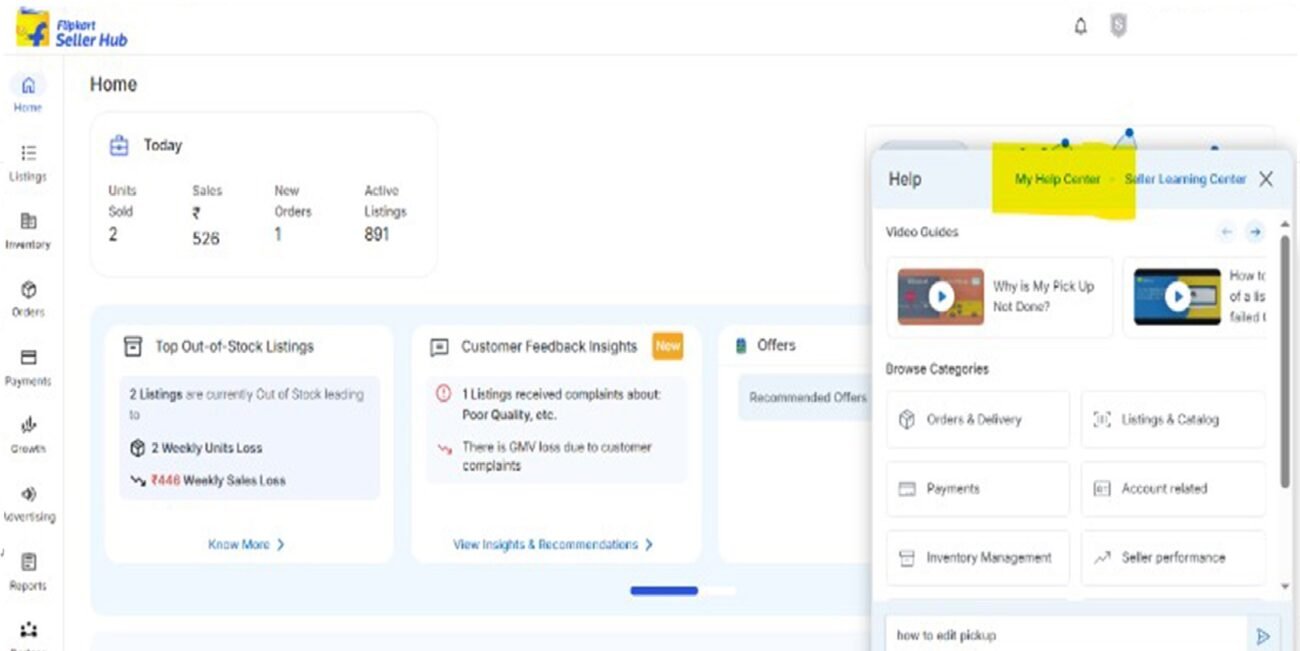
Step- 2
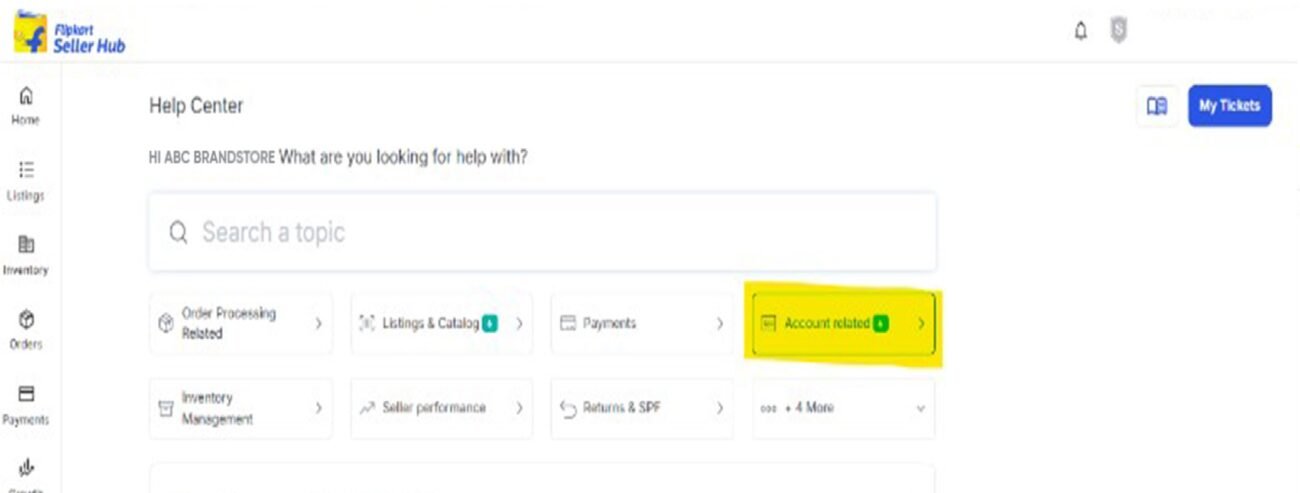
Step- 3
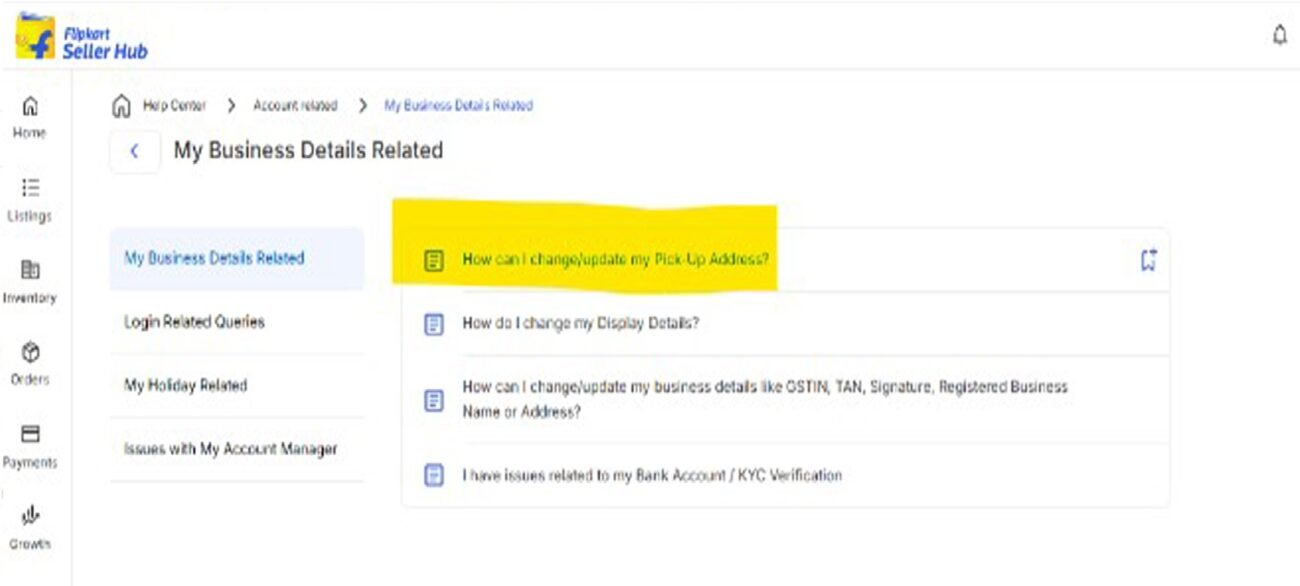
Step- 4
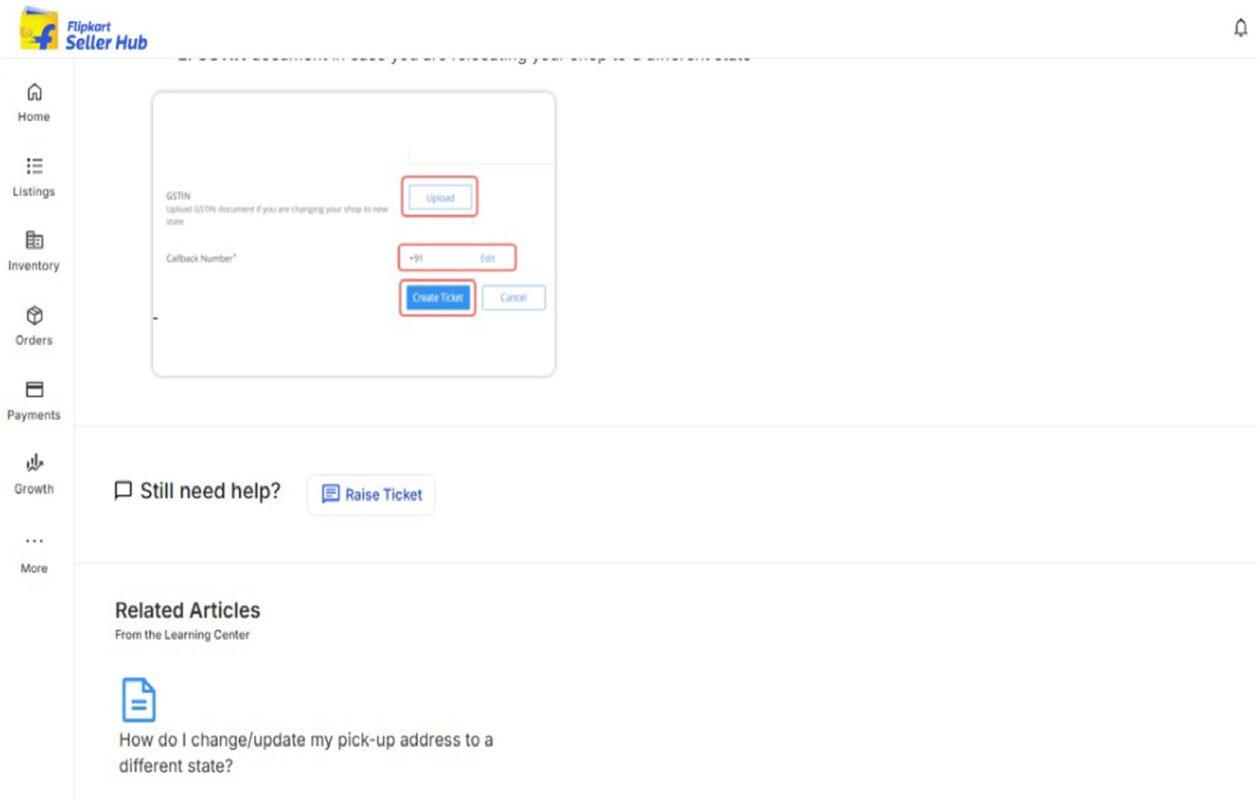
Step- 5
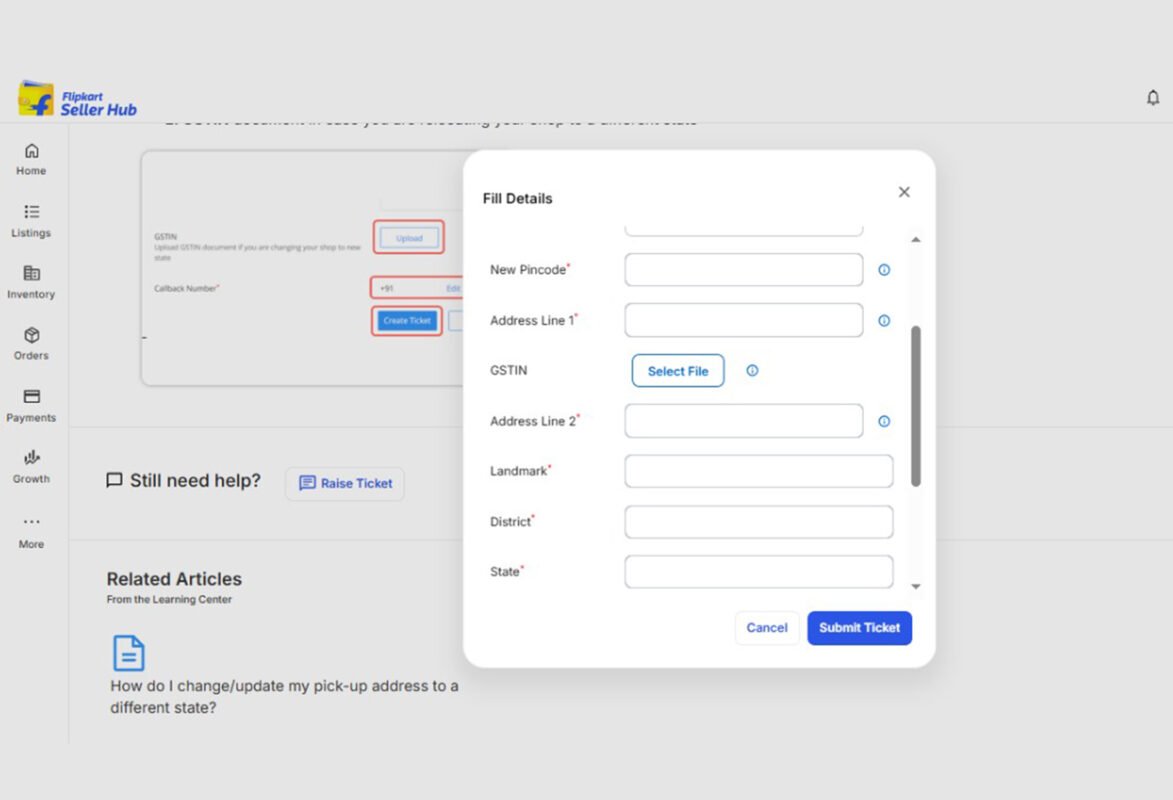
Method 3: via Flipkart Seller App

If you are constantly on the move, the Flipkart Seller App provides you with an easy way to make changes to your pickup address. Just open the app, click on Profile, then navigate to Settings, followed by Shipping Details. You can find the “Edit” or “Add a pickup address” link here. Enter new information carefully, like contact name, full address, and pin code, and tap Save afterwards. It is particularly handy for sellers who are constantly on the move or run their store from a distance. Like the website version, it would take 1–2 days to update changes of address, so look out for updates in the app.

What If the New PIN Code Is Not Serviceable?

If Flipkart’s shipping partner eKart does not cover your new PIN code, opt for a third-party shipping service or place a request through Seller Support under the “Return Pickup Address Change” option. Prepare documents like GSTIN, phone number, and address proof. This ensures your pickup location is activated and in use without impacting your order flow.

Common Errors & Why Updates are Important

Common mistakes such as failing to do address verification, failing to cancel pending orders, or forgetting logistics coverage—these can result in missed pickups and delayed delivery. Maintaining your pickup address up to date leads to quicker shipping, fewer returns, and more streamlined operations, and helps in delivering better seller performance and satisfied customers through Flipkart’s high-end account management service.

Conclusion 

It is easy to modify your pickup location—either through the web, Seller Hub, or app. To ensure seamless logistics, fewer errors, and expert assistance, look for professional Flipkart account management services to guide the way.
Change Pickup AddressFlipkart account managementflipkart account management servicesFlipkart seller accountHow to Change Pickup Address
Newer Add Prime to Your Products on Amazon India – Here’s How
Back to list
Older How to Change Pickup Address in Amazon Seller Account

Related Posts

Recover Your Suspended Flipkart Seller Account Permanently
06 Jul
Blog, seller account management

How to Recover Your Suspended Flipkart Seller Account Permanently?

  • July 10, 2026
  • Posted by author-avatar Admin
Many people don’t know how to deal with suspension on Flipkart. Orders just stop coming in, customers start asking questions, and basic...

Continue reading

Meesho vs Flipkart
18 Mar
Blog, seller account management

Meesho vs Flipkart: Which Marketplace Is Best for Zero Commission Selling?

  • June 3, 2026
  • Posted by author-avatar Admin
The capacity to sell products through online channels experiences a rapid transformation because of India's expanding eCommerce industr...

Continue reading

Ecommerce Account Manager
13 Mar
Blog, seller account management

Can an Account Manager Increase Your Marketplace Sales?

  • June 3, 2026
  • Posted by author-avatar Admin
Doing business across multiple online marketplaces, such as Amazon, Meesho, eBay, and Flipkart, can provide incredible growth opportuni...

Continue reading

Flipkart Commission Fees
27 Feb
Blog, seller account management

Flipkart Drops Commission Fees For Products Listed Under ₹1,000

  • June 3, 2026
  • Posted by author-avatar Admin
The Indian e-commerce market will experience its first major transformation after Flipkart announced it will eliminate commission fees ...

Continue reading

Amazon-Flipkart-Meesho
25 Feb
Blog, seller account management

Amazon vs Flipkart vs Meesho: Best Platform for New Sellers in 2026

  • June 3, 2026
  • Posted by author-avatar Admin
The e-commerce landscape in India has been growing at a very fast pace in the last ten years, which is allowing sellers to cater to buy...

Continue reading

Flipkart Seller
05 Dec
Blog, seller account management

Common Flipkart Seller Mistakes Beginners Should Avoid – and How to Improve Sales

  • June 3, 2026
  • Posted by author-avatar Admin
Moving into the marketplace of Flipkart is both exciting and competitive. Although anyone can become a seller in just a few hours, a lo...

Continue reading

Sell on Flipkart India
10 Oct
Blog, seller account management

How to Sell on Flipkart India

  • June 3, 2026
  • Posted by author-avatar Admin
E-commerce in India is amongst the fastest-growing business models, and Flipkart is one of the top online marketplaces that are changin...

Continue reading

30 May
Blog, seller account management

What is Flipkart FBF and How Does it Work? 

  • June 3, 2026
  • Posted by author-avatar Admin
Are you planning to have a Flipkart seller account, or are you an existing seller on Flipkart? Whatever the case, you might have come a...

Continue reading

    Close
    Categories
    • Blog
    • seller account management
    Recent Posts
    • How to update gst and bank details
      How to Update GST and Bank Details on Meesho?
      July 10, 2026 No Comments
    • Recover Your Suspended Flipkart Seller Account Permanently
      How to Recover Your Suspended Flipkart Seller Account Permanently?
      July 6, 2026 No Comments
    • scale meesho orders
      How can Meesho Suppliers Can Scale From 100 to 1,000 Orders Monthly?
      July 1, 2026 No Comments
    Recent Comments

      At Selling OS, we are committed to streamline your ecommerce business operations in a consistent manner

      • GST Number : 07AFNFS4395E1ZJ
      Facebook Instagram Linkedin X-twitter

      Quick Links

      • Home
      • About Us
      • Services
      • Contact Us

      Useful links

      • Blog
      • Payments
      • Partners
      • Terms and Conditions
      • Privacy Policy
      • Refund Policy

      Services

      • Global Entity
      • Ecom Website Development
      • Graphic Designing

      Contact Info

      7/23G, Block 7, Kirti Nagar Industrial Area, Kirti Nagar, New Delhi, Delhi, 110015

      +91 7290002939

      info@sellingos.com

      ©Copyright 2025 Selling OS. All rights reserved

      Close
      • Home
      • About us
      • Services
        • Amazon
          • Amazon Europe Account Management Service
          • Amazon Global Account Management Service
          • Amazon India Account Management Service
        • Etsy
          • Etsy Account Management Services India
          • Etsy Account Management Services UK
        • eBay
          • Ebay USA Account Management Service
          • Ebay UK Account Management Service
        • Walmart Account Management Service
        • Flipkart Account Management Service
        • Shopify Store Management Services
        • IndiaMart Account Management Services
        • Jio Mart Account Management Service
        • Meesho Account Management Service
      • Solutions
        • Ecommerce Shipping & Logistics Solutions
        • Global Ecommerce Payment Solutions
        • Ecommerce Creative & Photoshop Solutions
        • End-to-End Dropshipping Solutions
      • Partner
      • Calculators
        • Walmart Calculator
        • Amazon Calculator
        • Etsy Calculator
        • Flipkart Seller Fees Calculator
        • Meesho Calculator
        • Amazon US Calculator
        • Ebay Calculator
      • Blog
      • Contact us
        • e-Commerce Account Management Gurgaon
        • e-Commerce Account Management Faridabad
        • e-Commerce Account Management Noida
      Sidebar

      WhatsApp us

      Enquiry Now!